
Docker运行OpenClaw
文件目录
openclaw/
├── data/
│   └── openclaw.json
└── docker-compose.yaml

##创建目录
mkdir -p openclaw/data
## 把 openclaw.json 放到 openclaw/data 目录下
cd openclaw
## 把 docker-compose.yaml 放到 openclaw目录下

## 修改data目录权限是 node
chown -R 1000:1000 ./data
openclaw.json
生产模式
需要修改的内容如下:
gateway.auth.token: 修改为随机的字符串models.providers.llm.baseUrl: 模型的base_urlmodels.providers.llm.apiKey: 模型的api_keymodels.providers.llm.models[0].id: 模型的id,测试使用的是qwen3.5-35b-a3bmodels.providers.llm.models[0].name: 模型的名称,测试使用的是qwen3.5-35b-a3b
{

"gateway": {
    "port": 18789,
    "bind": "loopback",
    "trustedProxies":[
      "127.0.0.1/32",
      "::1/128"
    ],
    "controlUi": {
      "enabled": true,
      "basePath": "/",
      "allowedOrigins": [
        "http://localhost:18789",
        "http://127.0.0.1:18789",
        "https://127.0.0.1:18789",
        "ws://127.0.0.1:18789",
        "wss://127.0.0.1:18789"
      ],
      "allowInsecureAuth": false,
      "dangerouslyDisableDeviceAuth": false
    },
    "auth": {
      "mode": "token",
      "token": "需要修改"
    }
  },

  "models": {
    "providers": {
      "llm": {
        "baseUrl": "需要修改",
        "apiKey": "需要修改",
        "auth": "token",
        "api": "openai-completions",
        "headers": {},
        "authHeader": true,
        "models": [
          {
            "id": "qwen3.5-35b-a3b",
            "name": "qwen3.5-35b-a3b",
            "api": "openai-completions",
            "reasoning": true,
            "input": [
              "text",
              "image"
            ],
            "cost": {
              "input": 0.5,
              "output": 1,
              "cacheRead": 0.1,
              "cacheWrite": 0.5
            },
            "contextWindow": 256000,
            "maxTokens": 256000,
            "compat": {
              "supportsStore": false,
              "maxTokensField": "max_tokens"
            }
          }
        ]
      }
    }
  }

}
测试模式
gateway.controlUi.allowedOrigins: 值修改["*"],允许所有请求头gateway.controlUi.dangerouslyDisableDeviceAuth: 值修改true,禁用设备配对gateway.bind:值修改为lan,允许外部ip访问- 可以使用原版镜像,例如
alpine/openclaw:2026.3.28 - 访问
http协议地址,http://ip:18789/#token=token的值
docker-compose.yaml
services:
  openclaw:
    # 测试模式可以使用原版镜像
    #image: alpine/openclaw:2026.3.28
    image: fedimoss/openclaw:2026.3.28
    container_name: openclaw
    restart: unless-stopped
    environment:
      TZ: Asia/Shanghai
      LANG: zh_CN.UTF-8

    ports:
      - "18789:18789"
      - "8789:8789"

    volumes:
      ### 注意执行 chown -R 1000:1000 ./data 来修改权限,否则可能会遇到权限问题
      - ./data:/home/node/.openclaw
    deploy:
      resources:
        limits:
          cpus: '4'
          memory: 8G
        reservations:
          cpus: '2'
          memory: 4G
WebUI问题处理
访问 https://ip:8789,注意是 https协议,使用了自签证书,强制信任访问.
token缺失
unauthorized: gateway token missing (open the dashboard URL and paste the token in Control UI settings)
访问的时候需要带上token,token就在配置在openclaw.json中的值重新访问https://ip:8789/#token=token的值
没有配对
pairing required
pairing required
此设备需要网关主机的配对批准。
openclaw devices list
openclaw devices approve <requestId>
在手机上?从桌面运行 openclaw dashboard --no-open 复制完整 URL(包括 #token=...)。
第一次需要进入容器内批准配对,按照页面提示执行命令
docker exec -it openclaw /bin/sh
openclaw devices list
openclaw devices approve <requestId>
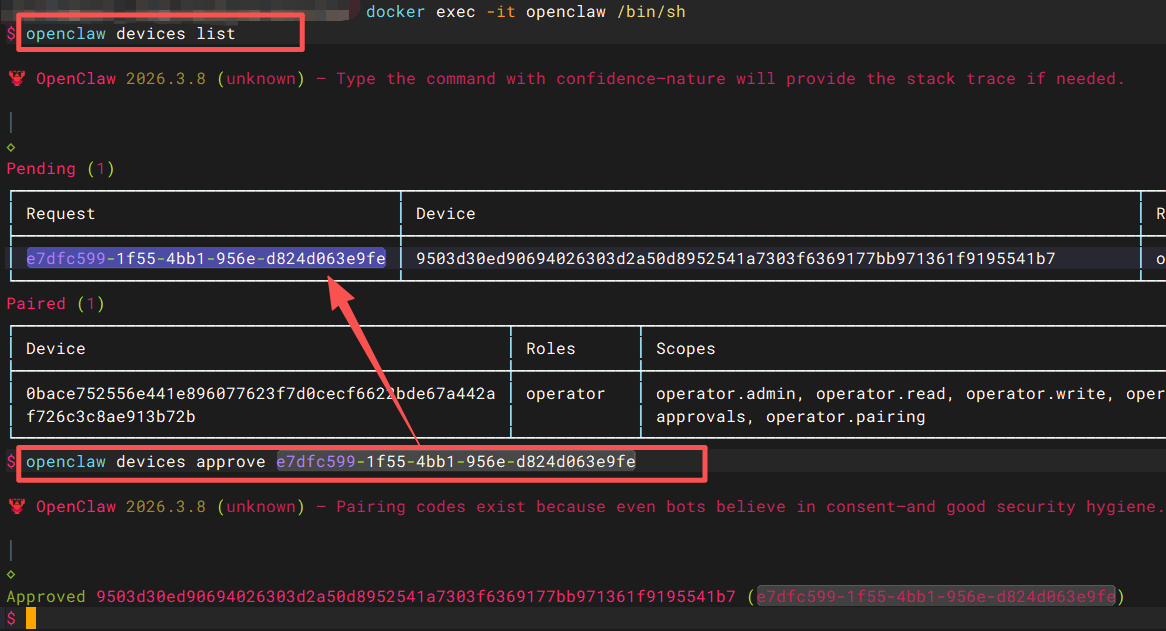
后续可以在web界面的 节点 菜单里进行批准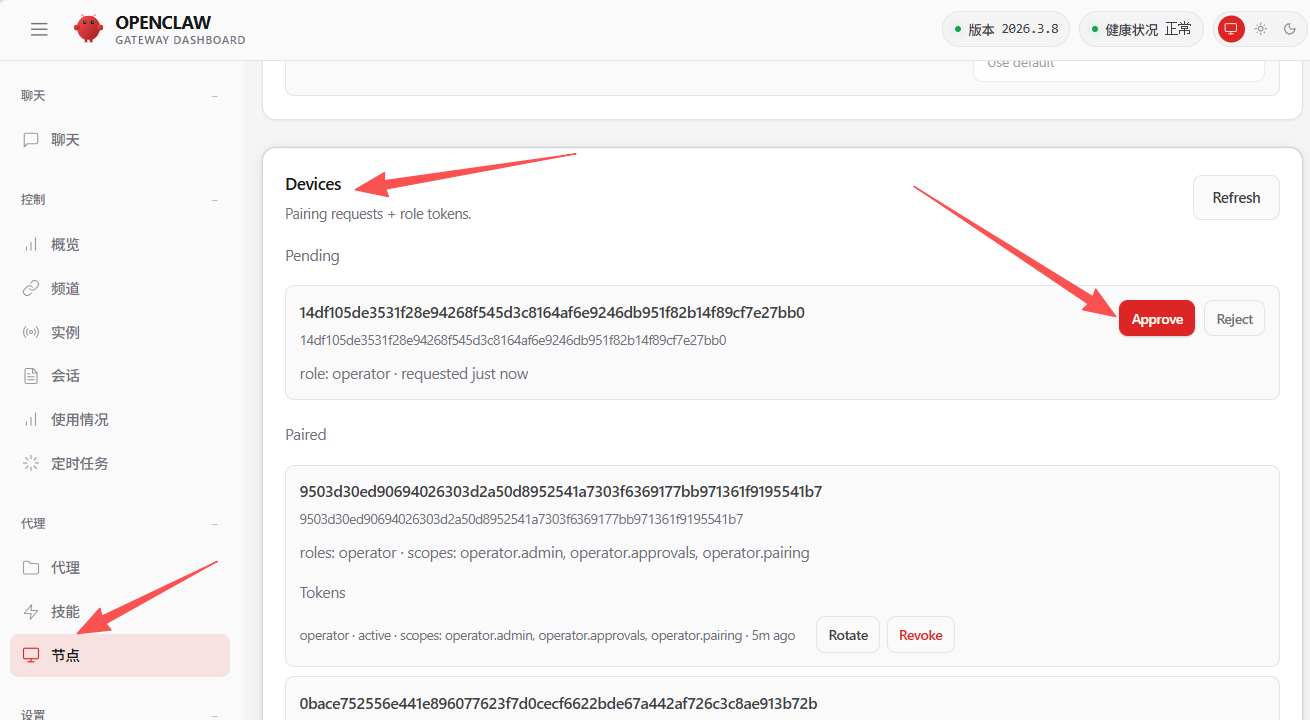
origin not allowed
origin not allowed (open the Control UI from the gateway host or allow it in gateway.controlUi.allowedOrigins)
把自己的ip和端口添加到 openclaw.json 的 gateway.controlUi.allowedOrigins 中